
Task Types
Use Task Types to pick Tasks by the kind of work you feel like doing.

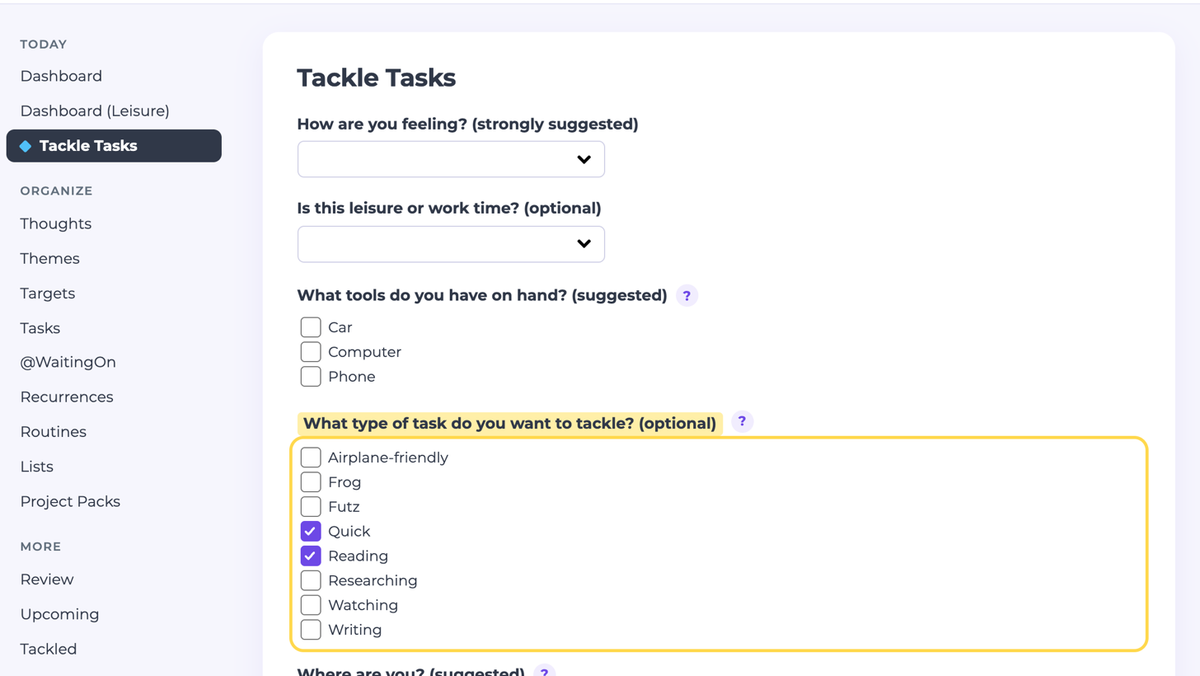
A Task Type is a kind of work. Task Types are optional, and a Task can have more than one.
These work well as Task Types:
- “Reading”
- “Writing”
- “Brainstorming”
Assigning one or more Task Types to a Task can help you filter Tasks not only by the mood you’re in, but by what kind of Task you feel like doing most right now, like writing, reading, or listening. This helps you get even more done in the same amount of time by reducing procrastination and resistance.
My Task Types are:
- Airplane-friendly
- Brainstorming
- Coding
- Errand
- Frog (a Task I have been actively avoiding)
- Futz (see this post about Futz Mode)
- Listening
- Quick (Tasks I can do in under 2 minutes)
- Reading
- Researching
- Watching
- Writing
Setting your Task Types
Set your personal Task Types in Settings, under “Customize Your Options.” You can rename, add or remove them there. Renaming one updates every Task that uses it.
Adding a Task Type to a Task
Your Task Types show up as check boxes whenever you add or edit a Task.
Task Types in Tackle Tasks
Tackle Tasks asks “What type of task do you want to tackle?” Check one or more, and you’ll see a Task if it matches any one of them. Check nothing to see every type of Task.
Task Types are one of three optional characteristics of a Task. The other two are Tools and Territories.


