
Tackle Tasks
Use Tackle Tasks when you’re ready to work and want to see only the Tasks you can do right now.

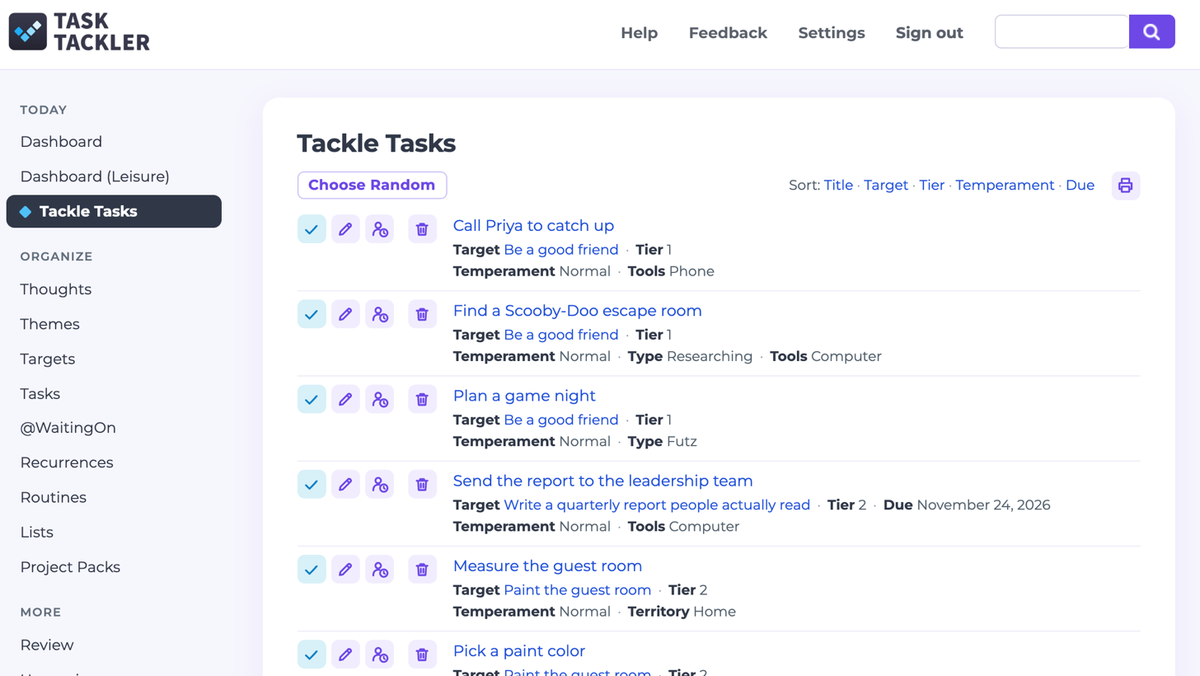
Tackle Tasks is where you go when you’re ready to work and want TaskTackler to tell you what to do next. It asks a few questions, and you get all the Tasks you can optimally do right now, in priority order.
You don’t have to answer everything. Here’s a rundown of the options:
How are you feeling? (strongly suggested)
Shows Tasks matching the Temperament you pick. This helps you be productive when you’re feeling lazy, and keeps you focused on the hardest Tasks when you’re feeling caffeinated and ready to go (and at risk of distraction by lower-energy work!)
Is this leisure or work time? (optional)
Shows Tasks from only your Leisure Targets, or only your Work ones. (See Leisure Mode.) Leave it blank to show them all.
What tools do you have on hand? (suggested)
You’ll only see a Task if you have every Tool it needs. Tasks that need no Tools always show. If you check nothing, you’ll only see Tasks that need no Tools.
What type of task do you want to tackle? (optional)
You’ll see a Task if it matches any one of the Task Types you check. Check nothing to see every type of Task.
Where are you? (suggested)
You’ll see a Task if it can be done in any of the Territories you check. Tasks with no Territory always show. If you check nothing, you’ll only see Tasks with no Territory.
Choose Target Categories (optional)
You’ll see a Task if its Target is in any one of the Target Categories you check. Check nothing to see every Category.
Only show me tasks that cost less than (optional)
Leaves out Tasks whose Total Cost is higher than the amount you choose.
Include all my overdue tasks
Check this box to add every overdue Task to the list, whether or not it matches your answers. This helps when you’re behind on some projects, but still want to capitalize on the Tackle Tasks workflow.
Results page
Your results come back with overdue Tasks first (including any Tasks due today), then everything else by Tier, and then by due date within each Tier.
Re-sort the list with the Sort links if you prefer a different order.
Use Random!
Decision paralysis? Click “Choose Random” and TaskTackler will hand you a random Task from the results. Complete it and you get another. “Pick another” skips the current selection; “Stop random” takes you back to the full list.
What Tackle Tasks doesn’t show
Tackle Tasks only shows Tasks you can do right now. That leaves out anything that’s completed, marked @WaitingOn, hidden until a later date, blocked by another Task, moved to Later Today, part of a Routine, or under a Someday Target. (See Keeping Tasks out of sight until you can do them.)
Printing your results
Click the printer icon  above your results to take the list with you. See Print Mode.
Just want to see what’s due today? That’s the Dashboard.


