
Later Today
Use Later Today to set a Task aside for a few hours without losing sight of it.

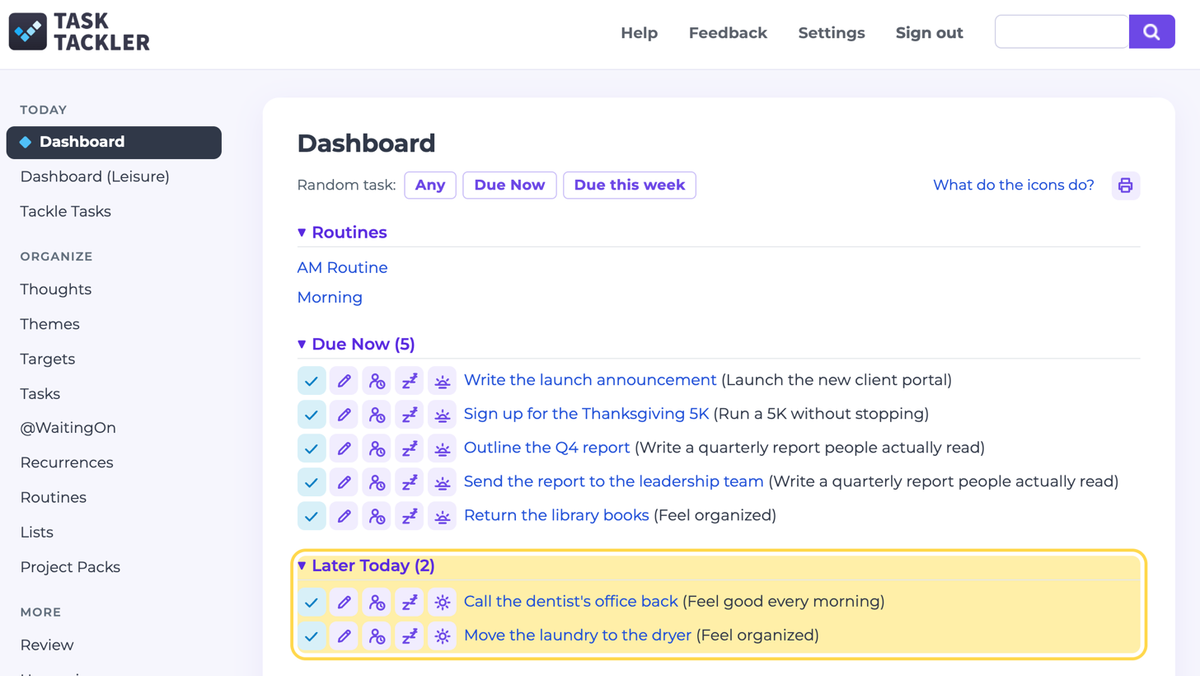
Later Today moves a Task that’s due now into its own section of the Dashboard, so it stops staring at you while you do other things.
These work well as Later Today:
- Putting out the garbage bins (it’s too early)
- A question you’re expecting an answer to today (you want to keep a close eye on it)
These are not good Later Today Tasks:
- A Task you won’t get to this week (Snooze it instead)
- A Task you can’t start until a certain day (use Hide Until)
- A Task that’s waiting on somebody else (use @WaitingOn)
Moving a Task to Later Today

On the Dashboard, every Task under “Due Now” has this icon. Click it.
The same icon is on every Task’s own page. From there it also makes the Task due today.
What changes
The Task moves down to the “Later Today” section of the Dashboard. It stays in sight, but it’s out of Tackle Tasks and it won’t come up if you click Random.
Moving it back

Click this icon and the Task goes back to “Due Now.”
A Task stays in Later Today until you move it back or complete it. Snoozing it, or giving it a due date after today, also takes it out.
Later Today is one of a few ways to put a Task away until you can do it. See Keeping Tasks out of sight until you can do them for the others.


