
Randomization
Use Randomization to let TaskTackler pick your next Task when you can’t decide.

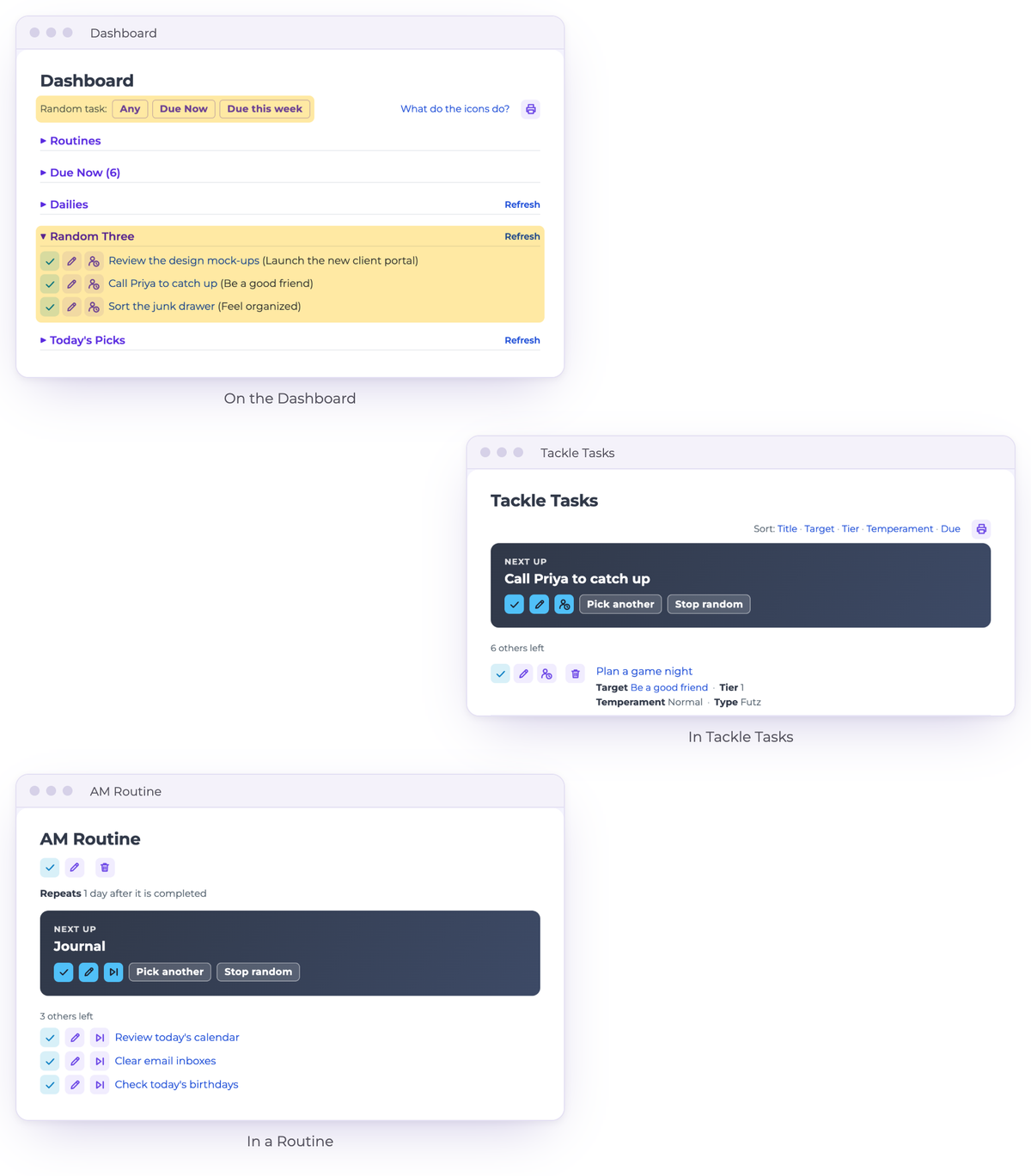
You’ve got enough to decide; let TaskTackler pick your next Task for you. I think Randomization makes it much more fun and low-friction to keep tackling Tasks.
Randomization in TaskTackler comes in many forms:
- random Task buttons on the Dashboard
- 3 new random Tasks every day on the Dashboard
- choose to work through Tasks in random order on Tackle Tasks or any Routine
- a random pick from every List (optionally shown on your Dashboard)
Random Tasks from the Dashboard
At the top of the Dashboard, beside “Random task:”, three buttons each open one Task:
- “Any” opens any Task across the entire app that you can do right now
- “Due Now” opens a Task that’s due today (or overdue)
- “Due this week” opens a Task that’s due now or in the next seven days
Not feeling the choice? Click again!
Random Three
Every day the Dashboard deals you a fresh Random Three: a few Tasks you might not have picked yourself.
They’re chosen the first time you open the Dashboard each day, and the choices stay the same for the rest of that day. Click “Refresh” on that section if you want to pick again.
Leisure Mode has its own Random Three, choose only from Tasks from your Leisure Targets.
Working through Tackle Tasks or a Routine in random order
In your Tackle Tasks results or on a Routine’s page, click “Choose Random.” A Task comes up in a box of its own, labeled “Next up.” Complete it and you get another, until there are none left. Under the box, TaskTackler tells you how many others are left.
- “Pick another” skips the current selection (it stays in the list, so it can come up again)
- “Stop random” takes you back to the full list
Other places to click “Choose Random”
- On a Target’s page, it opens one of that Target’s Tasks you can do right now
- On the Tasks page, it opens one Task from the whole list
- On the Targets page, it opens one of your active Targets (for when you can’t decide which one to work on)
A random pick from a List
Check “Include on dashboard” on a List, and the Dashboard shows one item from it each day under “Today’s Picks.” That selection remains for the day. Don’t like that one? Click “Refresh” and you’ll get a different selection.
Go back to a List’s page at any time to see a truly random selection; each time you refresh the page, you’ll get a new pick.
What never comes up in Random
- A Task you’ve moved to Later Today
- A Task under a Someday Target
- A Task you can’t do yet: one that’s hidden until a later day, blocked by a Dependency, or marked @WaitingOn


