
Tiers
Use Tiers to tell TaskTackler which Targets matter most right now.

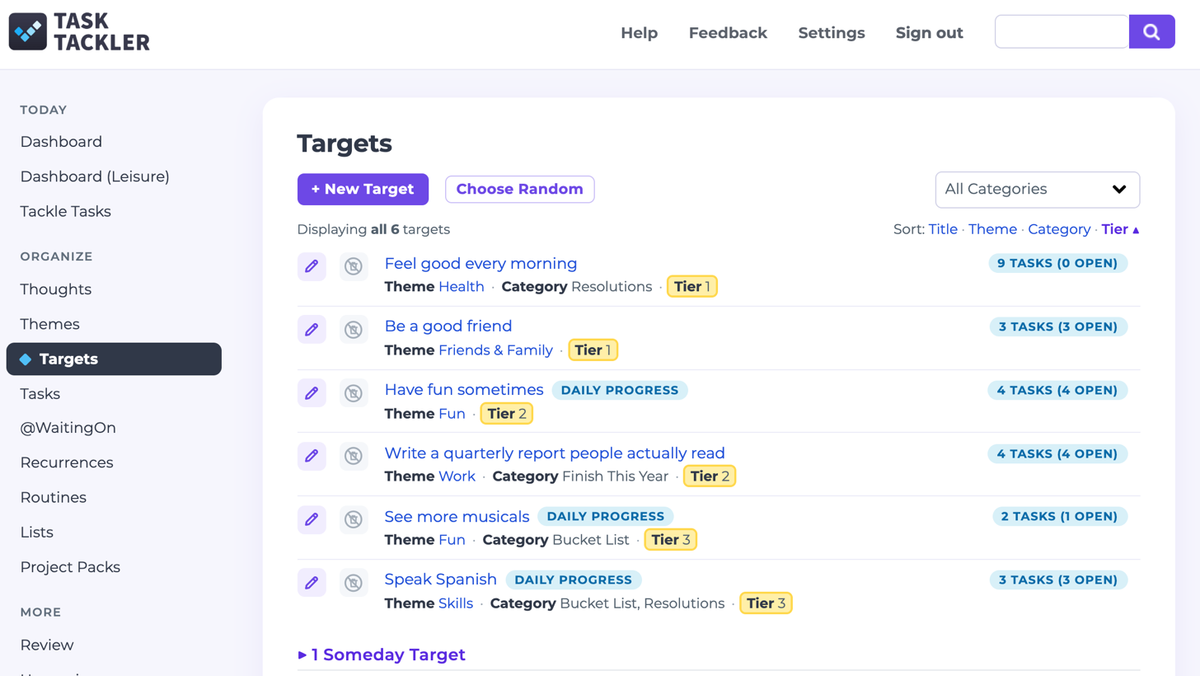
A Tier is how important a Target is to you right now. Every Target must have one: 1-4, or Someday.
- 1-4 are active Targets, with 1 being highest priority
- Someday is a Target you may want to work on one day, but not now
Tiers belong to Targets, not Tasks. Every Task inherits its Target’s Tier. This keeps you from having to decide how important each individual Task is over and over, when we believe the priority is really associated with a Target.
Where you’ll see Tiers
Tier is how Tasks are ordered in most places in the app, so you see your highest-priority Tasks first.
- Tackle Tasks lists overdue Tasks first, then everything else by Tier
- The “Due Now” section of the Dashboard is in Tier order
- The Targets and Tasks pages can both be sorted by Tier
Someday
Someday is for a Target you may want to work on one day, but not now. You can add Tasks to a Someday Target, but they will not show up in your workflow.
Ready to work on it? Flip the Target to a numbered Tier, and all those Tasks will appear instantly throughout the rest of the app. Similarly, if you’ve decided to hold off on a Target, moving its Tier to Someday will instantly hide those Tasks.
Changing a Tier
Did your priorities change? Edit  the Target and pick a new Tier, and all of its Tasks adjust instantly.
The Review process will also point out Targets that look stalled, so you can move them to a different Tier (or to Someday) right there.


