
Project Packs
Use Project Packs to add a ready-made project to your account in one go.

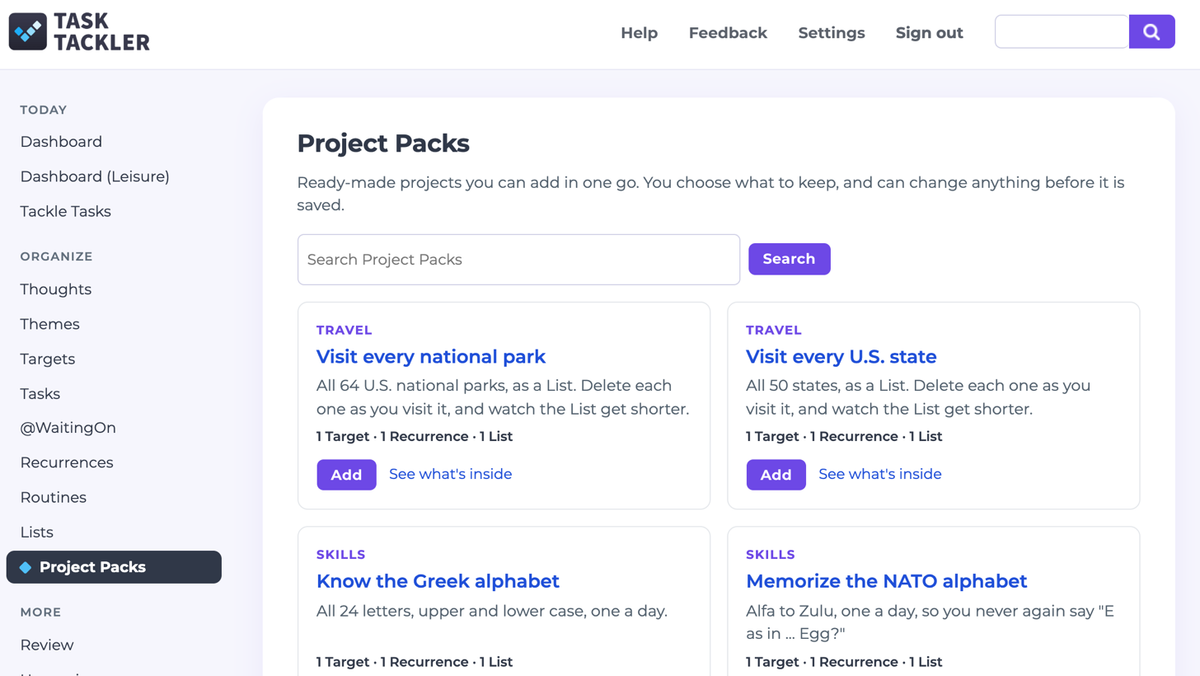
A Project Pack is a ready-made project you can add to your account in one go: Targets with their Tasks and Recurrences, and sometimes Routines and Lists.
It’s for the projects lots of people have, where someone else has already thought through the steps. You choose what to keep, and you can change anything before it is saved.
Finding a pack
Click “Project Packs” in the menu to see the library. Each pack shows what it holds, like “1 Target · 1 Task · 3 Recurrences · 1 List.” Click “See what’s inside” for the full list. Looking for something in particular? The search box at the top of the library looks through every pack, down to the items on its Lists.
Some posts on The To Do List will come with a pack, too, so you can read the idea and then add it.
Adding a pack
Click “Add.” You’ll see the whole pack laid out, ready to change. Nothing is saved until you press Add at the bottom.
Theme
Choose which Theme the pack’s Targets go in: one of yours, or a new one. If you already have a Theme that fits, TaskTackler suggests it and tells you why.
Targets
Each Target has a suggested Tier and any Target Categories. Change whatever doesn’t fit your life. Uncheck any Targets you don’t want.
Tasks
Each Task starts on your first Temperament, with buttons to change it. You can also change its Tools, Territory and Task Types, give it a due date, or uncheck it to leave it out.
For a Recurrence, you can change when it comes back: the number of days after it’s completed, or its schedule (like 1st of the Month).
Routines
A pack’s Routine arrives with its steps in order. Change how often it comes back, pick the Target its steps count toward (one from the pack, or one of yours), and give each step a Temperament. Uncheck the Routine, or any step, to leave it out.
Lists
Some Lists arrive with items already on them; you can change them once the List is added. Check “Show one item from this List on my Dashboard each day” if you want it under Today’s Picks. Uncheck a List to leave it out.
NEW
A Tool, Territory, Task Type, or Category that you don’t have yet is marked NEW. If you keep it, it’s added to your Settings.
New to TaskTackler?
You can start your free trial with a pack. Once you’ve set your Temperaments, the pack takes the place of making your first Theme, Target and Task.


