
Getting set up
Use the setup steps to give TaskTackler one goal, its first Tasks and your moods, then add the rest whenever you’re ready.

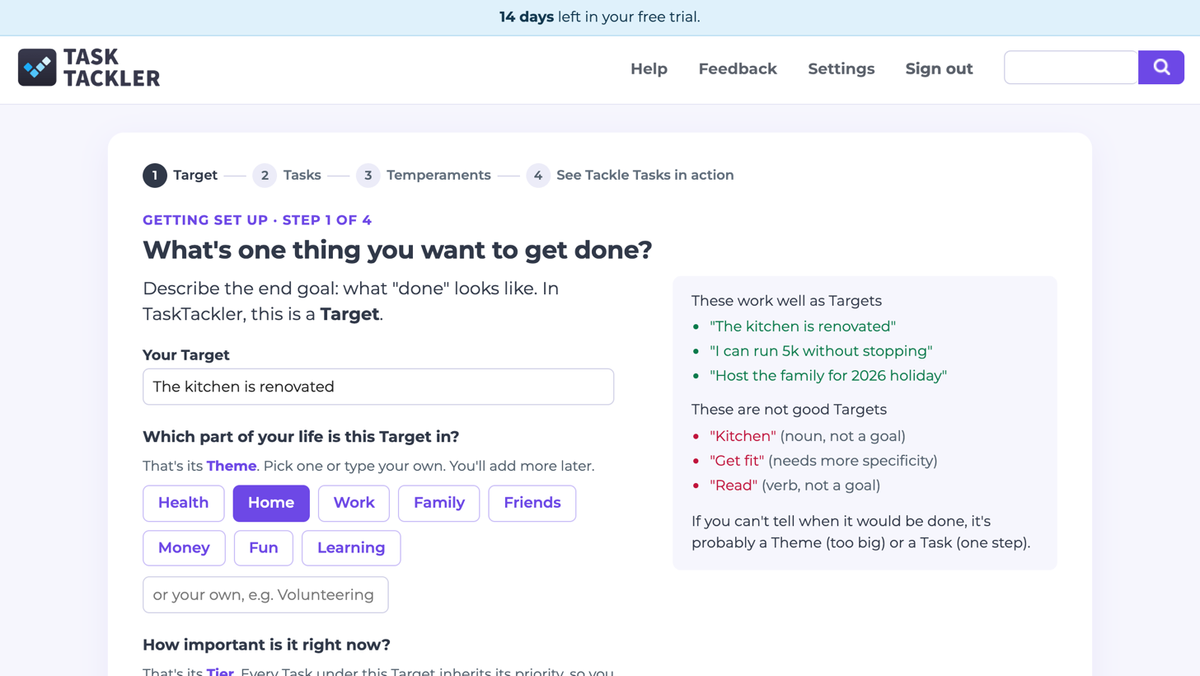
When you open a new account, TaskTackler walks you through a short setup. The first four steps are required, and they follow one goal from start to finish.
You can be up and running in a couple of minutes. But the more time you put into loading your life into TaskTackler, the sooner you’ll be enjoying all its features. If you’re anything like me, loading your life into a task app is the really fun part!
1. Name one thing you want to get done
That’s your first Target: a description of your end goal. It’s an outcome, not an activity; it should describe what “done” looks like.
These work well as Targets:
- “The kitchen is renovated”
- “I can run 5k without stopping”
- “Host the family for 2026 holiday”
These are not good Targets:
- “Kitchen” (noun, not a goal)
- “Get fit” (needs more specificity)
- “Read” (verb, not a goal)
Then tell TaskTackler three things about it:
- Its Theme: the part of your life it’s in, like Health, Home, Work, Family, Friends, Money, Fun, or Learning. Pick one or type your own; you’ll add more later.
- Its Tier: 1 (mission critical), 2 (regular order), 3 (as you have time), or 4 (when you get to it). Every Task under this Target inherits its priority, so you never have to rank Tasks one by one. (You can also add “Someday” Targets, but that’s no fun for your first Target.)
- Whether it’s Work or Leisure. Go by how it feels, not by whether it’s literally part of your job. (See Leisure Mode.)
2. Add your first Tasks
A Task is one thing you can do towards your Target, and is small enough to finish in one sitting. If your Target is “The kitchen is renovated,” a Task might be “Measure the wall for cabinets” or “Compare the three contractor quotes” or “Browse Pinterest for 5 minutes for spice rack ideas.”
Aim for 2-3 to get the feel for things. It’s always better to break work down into more steps (and get the satisfaction of checking more boxes).
3. Choose your Temperaments
A Temperament is the mood you need to be in to do a Task. Every Task has one, and only one. This is a core feature of TaskTackler: matching your mood to your work, so you can get (way) more done with (way) less resistance.
My personal Temperaments are pre-loaded for you:
- Lazy
- Normal
- Sharp
Keep those, pick different ones (like Anxious, Creative or Social), or add your own. Three is plenty at first; four is probably the max.
Then pick the Temperament you’d ideally like to be in to complete each Task you just added. If more than one might work, pick the lowest-energy one.
4. See Tackle Tasks in action
Tell TaskTackler how you’re feeling right now, and it will show the Tasks that fit that mood, and keep the others out of your way. That’s Tackle Tasks, the heart of TaskTackler.
Tackle Tasks is further enhanced as you complete more setup: adding Territories (home, office), Task Types (brainstorming, writing), and Tools (computer, car) to further narrow down and prioritize what you’re working on next.
Keep going
You can escape the Setup Wizard at this point, but TaskTackler has many more features. The “Keep Going” page shows you the rest of what’s there, as cards you can open in any order. (None are required... if they don’t resonate with your life, skip ’em.)
- More Themes: list the other parts of your life
- Territories and Tools: where a Task has to be done, and what you need to have with you
- Task Types: the kind of work it is (reading, researching)
- A Routine: a set of Tasks you do together, again and again, like a Morning Routine, Bedtime Routine, Weekly Review, or Exercise Routine
- A Recurrence: a Task that repeats, like “Pay rent” or “Water the plants”
- A Thought: jot an idea down, then decide later whether it becomes a Task, a Target, or nothing
- A List: things to pick from, like books to read or movies to watch
A card is marked “Done” once you’ve set that up.
The page stays in your menu as “Finish setting up” until you’ve done them all, or you click “Hide this page.”
After setup
You can rename, add or remove Temperaments, Territories, Tools and Task Types any time in Settings, and Themes from the Themes page.
Ready to work? The Dashboard shows what’s due and suggests a few Tasks each day. Tackle Tasks asks a few questions and gives you the Tasks you can do right now, in priority order.
Then keep loading in your life: more Targets, more Tasks, and the Thoughts you haven’t decided what to do with yet. For the big picture, see What is TaskTackler?


